Working on several work items
You do not need a second site to work on a second work item. A work item is a Trac ticket on a WordPress Core site or a GitHub issue on a Gutenberg site; the branching and switching behaviour is the same for both.
A site is the expensive part: a clone, an npm install, and a first build — minutes of work, and the thing this app exists to spare you. A work item is the cheap part. Each one you link gets its own branch inside the site, so moving between them is a file swap that takes seconds rather than another clone and another install. Core uses ticket/NNNNN; Gutenberg uses issue/NNNNN.
Each work item keeps its own changes. What you edited for one is not in the tree while you are on another, and what you submit contains only the current work item's changes.
Starting a second work item
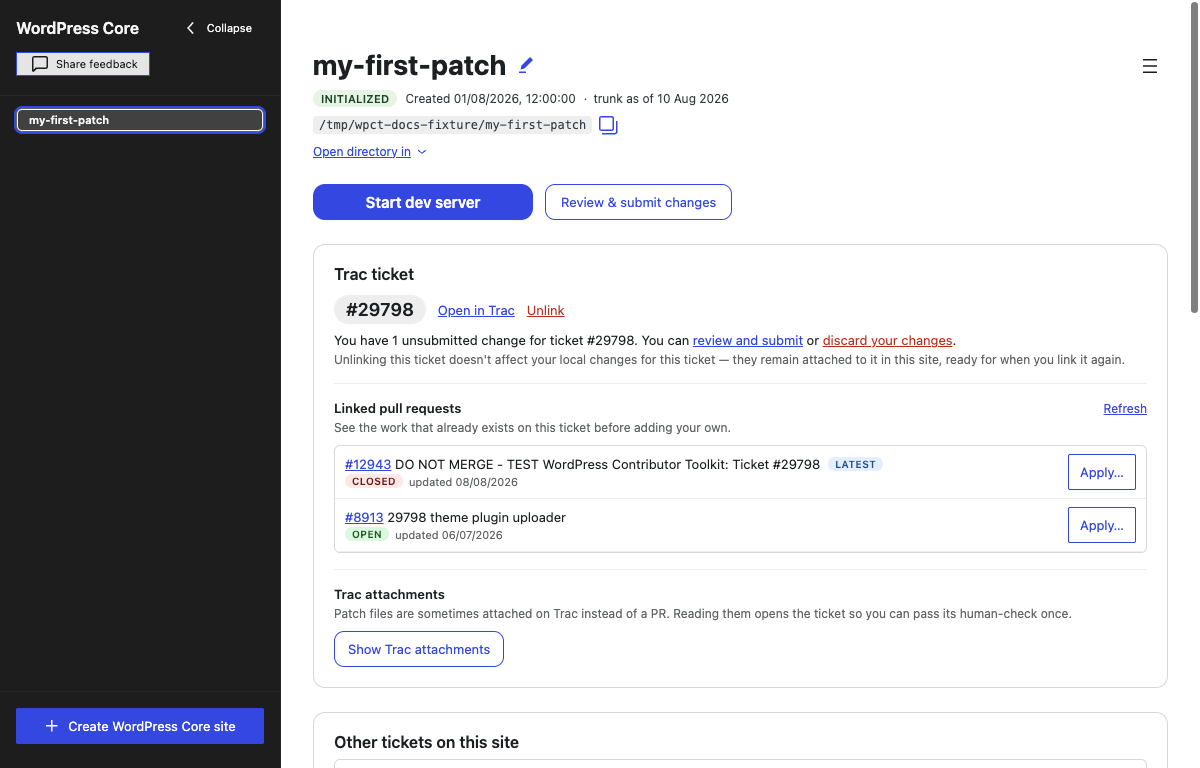
While a work item is linked, its Trac ticket or GitHub issue panel shows that item rather than a field to type another one into. Starting a second one is two steps:
- Click Unlink. Your changes are parked on the first item's branch and the site returns to trunk — nothing is lost, and the item appears under Your tickets on this site or Your issues on this site.
- Type the next number into the field that is now back, and click Link ticket or Link issue.
Nothing is installed and nothing is rebuilt: node_modules and the database belong to the site, and both stay exactly as they are.
Built assets belong to the site too, which has a consequence. A switch changes the source but does not rebuild, so a running dev server may keep serving assets built for the work item you just left. Run npm run build in the Terminal after switching if you want to see the other item's changes immediately. On a Core site the relevant source is usually under src/; on Gutenberg it can be in any package the build produces.
With the build watch running, you do not have to do any of that, and the switch does not interrupt it. The files the checkout writes are the files the watch recompiles, so only what actually changed is rebuilt: the Build watcher tab reads (compiling) for a few seconds and then (watching) again, and it never goes to (paused). The one switch that does pause it is the one that puts back a pull request you had parked on a work item, because that one installs and rebuilds afterwards. A switch made while the tab still reads (building) pauses it too: a watch that has not finished starting is not watching yet, so it would not pick the checkout up.
Your work items on this site
The site's saved work items get their own card, below the current work-item card and Apply a patch or PR. It appears once the setup checklist is finished or skipped, and only when the site has work on an item other than the one you are on — a site with nothing else to offer does not get an empty card.
With an item linked, the card is headed Other tickets on this site or Other issues on this site, and each row offers to switch. The following screenshots use a Core site:

With no item linked, the same card is headed Your tickets on this site or Your issues on this site, and each row is a Continue working on #NNNNN link. This is how you come back without having to remember the number:

Rows are listed most recently used first, with edited 2 days ago underneath — and after a week, the date itself. Every control on the card is disabled while an install, a build or a trunk update is running, because all three are writing to the same working directory a switch would swap.
What a switch says while it runs
A switch is a scan of the working tree followed by a checkout. On a real wordpress-develop that is seconds, not minutes, but it is long enough that a silent window looks like a hung one — so the panel narrates it, under a spinner:
- Saving your work on #59234… — the work item you are leaving is being committed to its branch. This is the part worth waiting out: it is the stretch where your edits are written down.
- Checking which files change…
- Swapping files for #61002… 63%
- Ready to work on #61002
If the file swap itself fails part-way — an editor or an antivirus holding a file open is the usual cause — the app marks the site and refuses every further work-item action with A previous switch from … to … did not finish. Retry it before making other changes. Two actions get through: retrying the same switch (Continue working on the item it was heading for, or linking it again), and Unlink, which puts you back on trunk. Both finish the file swap and nothing else; neither saves the half-swapped files as work. Your changes on the item you were leaving are not at risk; they were committed to its branch before any file moved.
Do not force-quit during a switch. A killed process writes no such marker, so the half-swapped tree is left behind with nothing saying so.
If a merge is in progress
The app never starts a merge, but the checkout is an ordinary Git repository, and someone with Git can: a mentor merging a branch into your work from a terminal, a git rebase, a git cherry-pick, or a git apply --3way that stopped on conflicts. Git then leaves conflict markers in the files and records the unfinished operation in the repository, waiting for a person to resolve it.
While that is the case, the site card shows a red banner: A merge started outside the app is in progress, naming the files still in conflict. Every action that would rewrite the working tree is refused with the same sentence, because each of them would erase the half-resolved merge without a word: linking or unlinking a work item, Continue working on, updating that work item to the current trunk, applying or reverting a patch, discarding changes, updating trunk, and deleting the item that is checked out. Reading still works: the patch export shows what is there, and deleting the site or another item's work is not behind the banner.
The app offers no button for it, because the way out is the terminal the merge came from, and the banner names the commands: resolve the files in your editor, then git add them and git commit (or git rebase --continue, git cherry-pick --continue, git revert --continue, for the operation in hand); or abandon it with git merge --abort (git rebase --abort, git cherry-pick --abort, git revert --abort). For a git apply --3way, which records no operation, the way back is git restore --staged --worktree on every file the patch touched, not only the ones in conflict. A merge whose files are all resolved but not yet committed is still in progress, and the banner says so. The state is read from the repository each time, so it survives closing the app and disappears on its own once the operation is finished or abandoned.
Deleting a work item's changes
Delete this ticket's work or Delete this issue's work, on each row, throws that item's branch away — every change you made for it, whether or not you ever submitted it. It asks first: Delete all work on #61002 on this site? This cannot be undone. There is no undo afterwards.
The card only lists work items you are not on, so this is never offered for the one in hand. To throw away the one you are working on, Unlink it first; its row then appears with the rest.
Deleting is deliberately a different gesture from switching, and from unlinking. Unlink on the Trac ticket or GitHub issue panel only puts the site back on trunk: the item's changes stay on its branch, and it reappears in the site's work-item card, ready to continue.
Edits you made before picking a work item
If you started editing before you linked a ticket or issue, those edits are on trunk, which the app never commits to. When you link a work item, the app stops and asks what should happen to them. The screenshot below shows the Core wording; a Gutenberg site says issue in the same places.
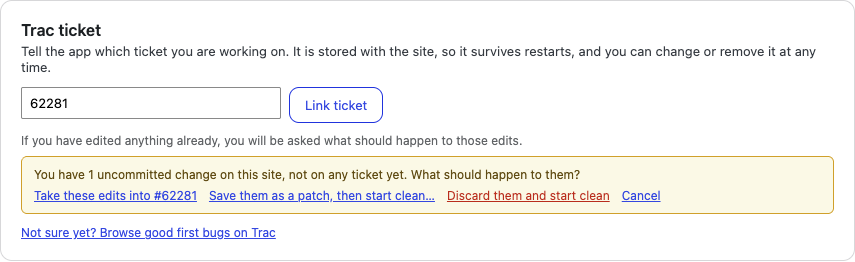
- Take these edits into #NNNNN — the edits come along and become part of that work item. This is the answer for I started editing, then realised which issue or ticket this is.
- Save them as a patch, then start clean… — the app asks where to save a
.diff, then discards the edits and links the work item. Cancelling the save dialog cancels the whole option and leaves everything as it was. - Discard them and start clean — the edits are lost; this cannot be undone, and it asks again before doing it.
- Cancel — nothing happens. No branch is created and no work item is linked.
Take these edits into #NNNNN is offered only for a work item this site has not worked on yet. An item that already has a branch has its own changes waiting to be restored, so loose edits cannot ride into it; the panel says so, and the other three choices stay.
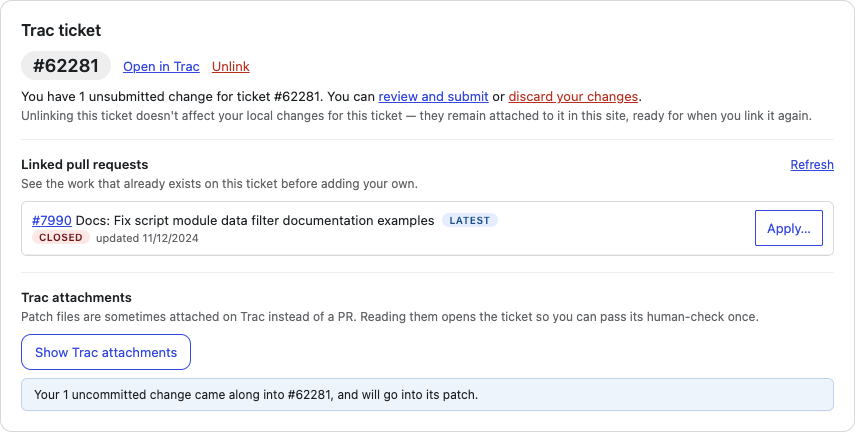
When the edits do come along, the panel says where they went: Your 1 uncommitted change came along into #62281, and will go into its patch.
If you saved them instead, the confirmation names the file — Your edits were saved to … and are no longer in the working tree — and stays on screen after the switch, so the path does not vanish with the panel that offered it.
Linking a work item from a clean tree asks nothing and shows nothing. A standing line under the link field says the question exists: If you have edited anything already, you will be asked what should happen to those edits.
Unsubmitted work for the item you are on
Once a work item has changes that have not been submitted anywhere, its card says so. On Core it reads:
You have 1 unsubmitted change for ticket #29798. You can review and submit or discard your changes.
This counts the work item's whole body of work — including everything parked when you last switched away. It is measured the same way the patch is, so the note and the diff are two readings of one walk rather than two answers. The count includes files the patch can only name rather than carry: change nothing but an image and the note still says one unsubmitted change, while the diff itself is empty.
Under it is the reassurance that matters here: unlinking does not touch those changes. They stay attached to the ticket or issue in this site, ready for when you link it again.
Returning to a work item does not make it clean or measure it from wherever trunk happens to be now. The same count and files return because the item is still measured from the trunk snapshot where its branch started. That baseline also drives the warning before applying another change: work committed when you switched away is still named as your work on this item.
When trunk has moved since the work item started
Updating the site moves its copy of trunk, but deliberately does not move existing work-item branches. When the app can see that the linked item started on an older trunk, a Core site's card says:
Trunk has moved since this ticket started. Newer patches may not apply cleanly. Move your work onto the current trunk here, or save a copy of it and start the ticket again.
Nothing moves on its own. The notice carries Update this ticket to the current trunk or Update this issue to the current trunk, which replays the item's work onto the trunk the site now has: the same lines you changed, on top of the new code, in one step. Edits you have not parked yet come along. It is all or nothing: if trunk and your work disagree, the app refuses, names the files and the reason, and moves nothing. These are the same conflicts Git itself would report for that merge. The button waits while an update, an install, a build or the dev server is running, for the same reason the discard link does.
On a Gutenberg site, if the move is refused, keep the issue's branch. Save a backup through Review & submit changes, and ask a mentor to help move your work onto current trunk. The app cannot resolve the conflict or import that backup. Do not delete the issue's work to start again: the saved file is a backup for the mentor, not a recovery step the app can complete.
On a Core site, the manual patch path is still available:
- Use Review & submit changes to save a patch of the work item's changes.
- Click Unlink so the item appears in the site's saved-work card.
- Click Delete this ticket's work on its row. This deletes the branch, not the patch you saved outside the site.
- Link the same work item again. Its new branch starts from current trunk.
- Apply the saved patch and check that the work still fits.
The app stays silent when it cannot identify a work item's original base; it does not substitute the current trunk and pretend the branch is current, and the button is not offered.
What a patch contains
A patch is everything on the current work item's branch since the point it was created — only that item's work, never another's, and never a change that arrived from a trunk update.
That last point has a consequence worth knowing. A work-item branch keeps the snapshot of trunk it was born on, even after you update the site to the latest trunk. The patch stays correct against that snapshot, which keeps it free of upstream changes you did not write — but a branch you started weeks ago may no longer apply to today's trunk. Use the card's Update this … to the current trunk action when you need a fresh base, then follow the guidance for your project above if it cannot proceed; the app does not replay the branch onto it silently.
Next steps
- Working on a Trac ticket
- Working on a GitHub issue
- Submitting your changes
- Staying up to date with trunk
If a PR is applied when you unlink a work item or switch to another one, returning to that item restores the same local PR copy, including your edits. This also survives restarting the app. Use Revert this PR to return to your own work and stop reopening that PR automatically.